
Bird — Ride Electric
Blue Jay Transit Inc.Travel & Local
4.816.17K Reviews
- Version
- 4.412.1.3
- Installs
- 10.00M
- Age Rating
- Everyone
Screenshots
Our Review of Bird — Ride Electric
 Analysis by Appyee
I tested Bird as a practical way to handle short urban trips, and my first impression was that its usefulness depends less on the ride itself than on how smoothly the app, phone, and vehicle stay connected. Bird is a free Travel & Local app from Blue Jay Transit Inc. built around shared electric vehicles, so it makes the most sense when I need to cover a gap between two places without committing to a car, waiting for a bus, or walking the entire distance.
The basic idea is easy to understand: open the app, look for an available vehicle, follow the rental flow, ride, and finish the trip in an approved place. That simplicity is its strongest quality, but it also creates a particular dependency. I am not just choosing transport; I am using a connected service in which finding a vehicle, beginning a session, and ending it all rely on the phone behaving properly at the right moments.
How Bird feels when the network is doing the work
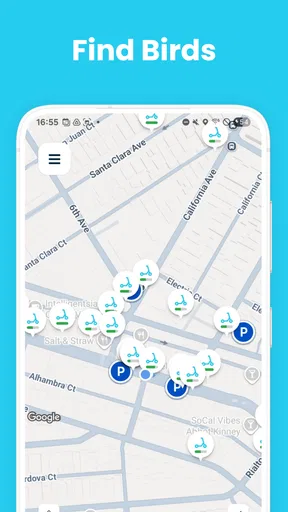
The map is the part I use first, and it changes the way I plan a trip. With ordinary transport, I usually check a timetable or walk to a known stop. With Bird, I first look at what is available near me and then decide whether the vehicle location makes the trip worthwhile. That can be more flexible, especially for the last stretch after a train or bus journey, but it means I need to think about availability before I start walking.
That network-dependent design is convenient when everything loads quickly. I can make a decision while standing outside a station or leaving a café, rather than visiting a rental counter. The app’s value is particularly clear for short, irregular journeys where a conventional rental would feel excessive. I can use it for a quick connection between neighborhoods, an errand that is too far on foot, or a final leg after public transport.
It is also where the first bit of friction appears. A vehicle shown on a map is not automatically as useful as it looks. It may be a few streets away, the surrounding road layout may make access awkward, or someone else may take it before I arrive. I have learned to treat the map as a live planning aid rather than a guarantee. If I am late for an appointment, I do not rely on a single nearby option.
The most important habit is to keep a backup plan before starting the ride. I check whether walking or public transport could still get me there, especially when the destination matters. That is not a criticism of the vehicle itself; it is a consequence of using a shared fleet whose availability can change while I am moving toward it.
What the phone adds to a very short trip
Bird works best for people who already keep their phone ready during travel. The device is not merely a key. It is the place where I search, make decisions, manage the session, and confirm that the trip has finished. That makes the experience feel lighter than traditional vehicle rental, but it also makes a low battery, poor reception, or a distracted moment more troublesome than it would be on a normal walk.
I would not open the app for the first time while rushing across a busy street. I prefer to check the map before I leave a building, then move toward the vehicle with the phone accessible but not constantly in my hand. This small change makes the process safer and less stressful. It also avoids the common mistake of reaching the pickup area and only then trying to work out where the vehicle is.
For visitors, the app can be a useful way to explore a city at a human pace. I can cover more ground than walking while still stopping easily at a shop, viewpoint, or quiet side street. However, it is not a replacement for a city transport planner. A public transit app is usually better when I need a dependable route across a long distance or when I want to compare several scheduled options. Bird is strongest for the flexible middle ground between walking and fixed-route transport.
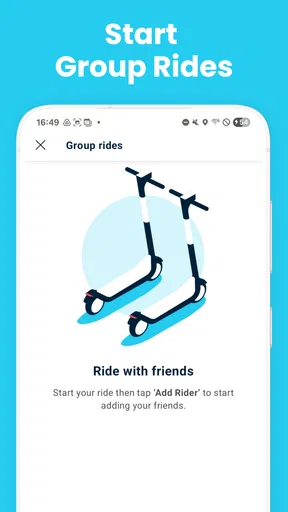
Families and groups should think about the phone workflow too. One person may be comfortable handling the app, but coordinating several riders can become less straightforward than simply boarding a bus together. The service suits an individual who wants control over a short trip more naturally than a group that needs one simple shared travel decision.
A realistic everyday journey
Imagine I leave a train station with a meeting several blocks beyond the main shopping area. Walking would take long enough to make the timing uncomfortable, while a car would be unnecessary. I open Bird near the station, inspect the nearby choices, and walk to the one that appears practical. Before beginning, I look at the destination area rather than focusing only on the pickup point. The end of the trip matters just as much as the beginning because I need somewhere suitable to finish.
During the ride, I keep the route simple and avoid treating the vehicle like a shortcut through every difficult street. When I reach the destination, I do not immediately walk away. I first make sure the session has properly ended and that the app reflects that change. This is one of my most useful Bird habits: the ride is not finished in my mind until the app confirms the ride is finished.
That extra pause is easy to overlook when I am carrying bags, meeting someone, or trying to get out of the weather. Yet it is exactly the sort of moment in which a connected rental can become frustrating. A few seconds spent checking the final state is more sensible than assuming the process completed just because I stopped moving.
When connectivity becomes the weak link
The app feels polished when the connection is stable, but a weak signal can interrupt the rhythm of the trip. Loading a map slowly is annoying before departure; uncertainty during the end-of-ride process is more serious because I want clear confirmation that the vehicle has been released correctly. I therefore avoid starting a rental in places where my phone is struggling to connect unless I have time to resolve the problem calmly.
My recovery approach is deliberately simple. I stop somewhere safe, keep the app open, and give the connection a moment instead of repeatedly tapping through screens. If the map is slow, I avoid wandering farther away from the vehicle while trying to fix it. If the final screen does not appear as expected, I check the app again before leaving the area. The goal is to preserve a clear sequence: locate, start, ride, end, verify.
This is also why I would not describe Bird as a completely spontaneous, no-preparation transport option. It can be spontaneous in the choice of route, but the digital part still deserves attention. A person who dislikes troubleshooting phone-based services may prefer a staffed rental desk or a conventional taxi, even if those alternatives are less flexible.
Using it without wasting mobile data
Bird is not the kind of app I open repeatedly just to browse. I use it with a purpose: check the nearby vehicles, choose a realistic option, and close the app when I am done. That approach is better for my attention as well as my mobile plan. Constantly refreshing a live map while walking around does not guarantee a better vehicle will appear, and it can make me less aware of traffic and other people.
When I know I will need a ride after leaving a station or venue, I check the service shortly before I am ready to travel rather than planning in detail far in advance. Shared vehicles move, so an early snapshot can become irrelevant. I also prefer a stable connection for the important actions and avoid making the rental process more complicated than necessary while moving between coverage areas.
For people with limited data, the sensible workflow is to reduce unnecessary map checks and rely on the app only at the moments that matter. Bird’s usefulness does not come from staring at the screen; it comes from turning a current availability check into a short physical journey. That distinction makes the service feel more manageable and helps keep the phone from becoming the main activity.
Where the experience is genuinely strong
The best thing about Bird is the freedom it gives me for short distances. I do not need to follow a timetable, find a parking space for a car, or commit to a long rental period. When a vehicle is nearby and my route suits this kind of travel, the app removes a lot of unnecessary ceremony. That is a meaningful advantage over many usual alternatives in the same travel category.
It also encourages a useful form of trip planning. Instead of asking only, “How do I get across town?” I ask, “Which part of this journey is worth doing on a shared electric vehicle?” The answer may be the route from a transit stop to a destination, a quick connection between two nearby areas, or a trip where walking is possible but inconvenient. That narrower role is where I find it most convincing.
The public response is strong as well: Bird holds a 4.8 average from around 289 thousand ratings, with roughly 16 thousand written reviews and over 10 million installs. Those figures do not make every ride perfect, but they show that the app has reached a large audience and that many users find the model useful enough to keep using.
Where I would choose something else
I would skip Bird when I need guaranteed availability, a precise arrival time, or a long cross-city journey. A scheduled bus or train is usually the better choice when reliability comes from a published timetable rather than a nearby shared vehicle. A taxi or ride-hailing service is more suitable when I have heavy luggage, need door-to-door travel, or do not want to manage the vehicle and app workflow myself.
I would also be cautious if my phone battery is low or my connection is unreliable. The service is built around a connected experience, so those conditions can turn a convenient short trip into a problem at exactly the wrong time. Someone who wants to leave the phone in a pocket for the entire journey may feel more comfortable with a transport option that does not require digital confirmation at multiple stages.
There is a similar trade-off for accessibility and comfort. A shared electric vehicle may be appealing for a quick personal trip, but it is not automatically appropriate for every passenger, route, weather condition, or street surface. I would judge the physical journey separately from the convenience of locating a vehicle. The app can make access easier; it cannot make an unsuitable route suitable.
Practical details before installing
Bird is free to download and is rated for Everyone, which makes it approachable for a broad audience. It first appeared on October 9, 2017, and the current version is 4.412.1.3. It requires Android 9 or later, so Android users on older devices should check compatibility before planning around it. The developer shown for the app is Blue Jay Transit Inc.
I appreciate that the app’s purpose is immediately clear without needing a complicated learning period. Still, new users should spend a minute understanding the complete journey rather than focusing only on finding a vehicle. The important questions are practical: can I reach the vehicle comfortably, is the destination appropriate for ending the trip, and will I have a dependable phone connection when I need to confirm the key steps?
That checklist is more valuable than simply asking whether the app is easy to use. Bird is easy when the surrounding conditions are right. Its difficulty comes from the interaction between live availability, the physical street, and the phone connection. Once I accept that, I use it more intelligently and expect less from it in situations where a fixed transport option would be safer or more dependable.
My connectivity verdict
Bird is a good fit for short, flexible urban travel when I have a charged phone, a workable connection, and enough time to make a sensible choice. Its connected design lets me find a shared electric vehicle at the moment I need one, which is much more convenient than arranging a traditional rental for a brief trip. The experience feels modern without being difficult, provided I stay involved in the important start and finish steps.
My main reservation is that the same connectivity that creates convenience also creates responsibility. I need to watch the app when locating the vehicle, avoid assuming that map availability is permanent, and verify the ride has ended before walking away. Those are small habits, but they separate a smooth Bird journey from an unnecessarily stressful one.
Overall, I recommend it to independent travelers, commuters handling the last part of a route, and anyone who regularly faces short urban gaps. I would not make it my only transport plan for time-critical journeys, poor-signal areas, heavy luggage, or routes better served by scheduled transit. Used within its natural limits, Bird is a genuinely useful travel companion: not a universal replacement for public transport, but a flexible connected option for the awkward distance between walking and a full car trip.
Verdict
Strengths of Bird — Ride Electric
- Quick access to shared electric bikes and scooters in supported cities.
- App shows vehicle locations and availability before you start a trip.
- Cashless payments make unlocking and ending rides convenient.
- Electric vehicles offer a quieter alternative to short car journeys.
- Ride history helps you review previous trips and charges.
Limitations of Bird — Ride Electric
- Service availability is limited to selected cities and operating zones.
- Vehicles may be unavailable or poorly distributed during busy periods.
- Unlock and per-minute fees can make longer rides expensive.
- Battery levels may vary, limiting how far you can travel.
- Parking rules and restricted areas can complicate the end of a ride.
Similar Picks in This Category
View All
Google Maps
Google LLC3.4

Google Maps Go
Google LLC4.1

Booking.com: Hotels & Travel
Booking.com Hotels & Vacation Rentals4.8

Google Earth
Google LLC3.8

Skyscanner Flights Hotels Cars
Skyscanner Ltd4.8

trivago: Compare hotel prices
trivago N.V.4.4
Frequently Asked Questions
What is Bird — Ride Electric and how does it work?
Bird — Ride Electric is a shared-mobility app for finding and renting electric scooters and, in some locations, electric bikes. After creating an account, you can use the map to locate an available vehicle, scan its QR code, review the ride details, and unlock it. The app generally charges for unlocking and for the time or distance used, depending on local pricing.
Where can I use Bird scooters or electric bikes?
Bird vehicles are not available everywhere, so coverage depends on your city and local operating permissions. Before downloading or planning a trip, open the app or check the service area to confirm availability near you. The map normally shows vehicle locations, operating zones, parking requirements, and restricted areas. Availability can also change during bad weather, maintenance, or periods of high demand.
How much does a Bird ride cost?
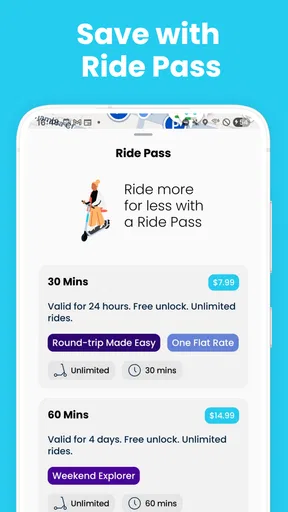
The price of a Bird ride varies according to your location, vehicle type, local taxes, promotions, and the current pricing model. In many areas, you may pay an unlock fee plus a per-minute charge, while other offers or passes can use different rates. Always review the fare displayed in the app before starting, because prices and additional fees may change.
What do I need to use Bird — Ride Electric?
You typically need a compatible Android or iOS smartphone, an internet connection, location services, and a valid payment method. Riders may also need to meet the minimum age requirement established in their city and accept Bird’s safety and rental terms. A driving license is not usually required for standard scooters, but local regulations may impose extra requirements, so check the rules shown in the app.
What should I know about safety, parking, and ending a Bird ride?
Before riding, inspect the scooter or bike, wear a helmet where required or recommended, and follow local traffic laws. Use designated bike lanes when appropriate, avoid sidewalks or restricted roads, and never carry another passenger unless the vehicle explicitly permits it. When finished, park responsibly in an approved location without blocking entrances, ramps, or walkways, then end the trip in the app and submit any requested parking photo.
